
The “First Class Attended Workflow” is designed to engage new clients after their initial class. It aims to ensure a positive experience, encourage feedback, and promote further engagement with your services.
Step-by-Step Guide to Create the Workflow
1. Create a New Workflow
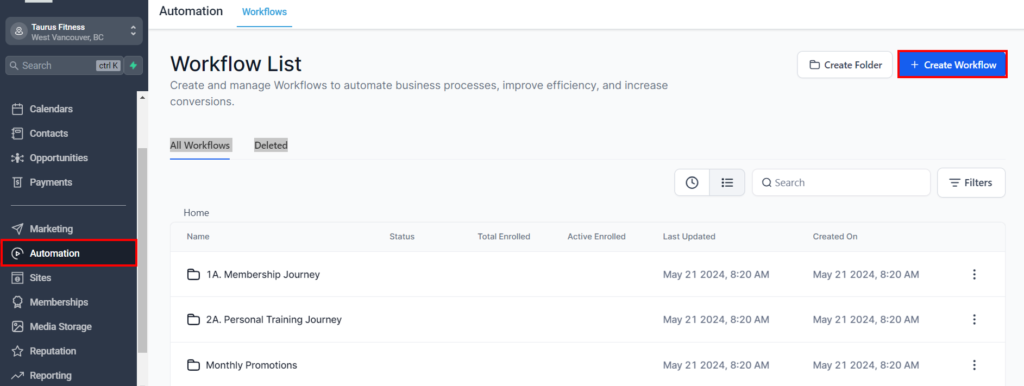
- Access the automation section from your dashboard
- Click “Create New Workflow” and name it “First Class Attended Workflow”.
Set the Trigger
- Choose the trigger to start the workflow
- Ensure the trigger is specifically for clients who have just attended their first class.
NOTE: This can be customized according to your preferences. You also have the option to manually add contacts to the workflow.
Send a Thank You Email
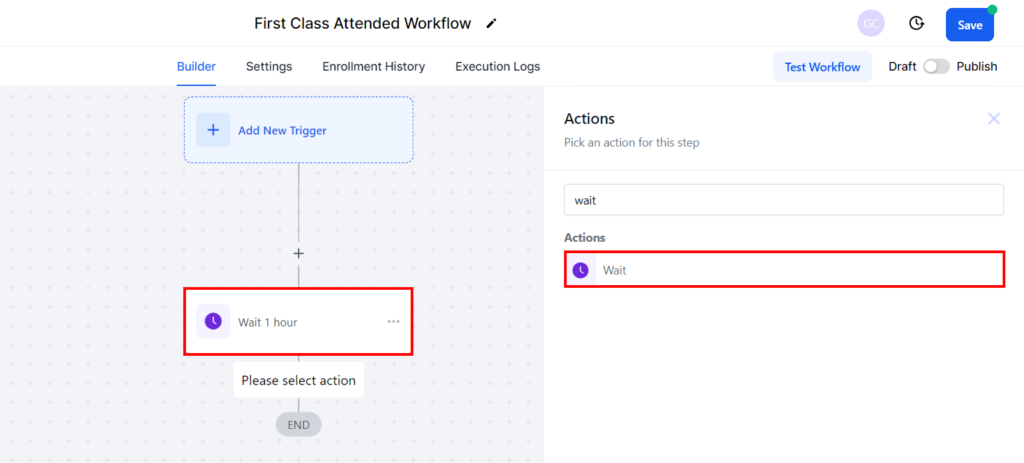
- Timing: Send the email immediately after the class or within a few hours. Add “Wait” action to achieve this.
- Content: Include a thank you message, a summary of the class experience, and any additional information or resources they might find useful.
Request Feedback
- Timing: Send a feedback request email within 24 hours of the class.
- Content: Ask for their thoughts on the class, what they liked, and any areas for improvement. Include a link to a feedback form or survey.
Provide Additional Resources
- Timing: Send this email within a week of the class.
- Content: Share additional resources like class schedules, tips for beginners, or links to relevant content that could help them get more out of their practice.
Monitor Engagement
- Track Metrics: Review how many clients are engaging with the emails, providing feedback, and redeeming the incentives.
- Adjust: Based on engagement data, adjust the workflow to improve effectiveness.
Further Engagement
- Follow-Up: Consider creating additional workflows for ongoing engagement, such as regular check-ins or special events.
Note: This workflow can be customized to fit your specific needs and preferences. You can also manually add contacts to the workflow for greater flexibility. Additionally, consider adding personalized messages, setting up automatic reminders, and incorporating feedback loops to further enhance the effectiveness of your workflow. These tips can help you create a more engaging and efficient process tailored to your goals.