
Why get the Member Birthday Workflow?
Boost customer loyalty and stand out from the competition with our Member Birthday Workflow. Celebrate your members on their special day and create a warm, fuzzy feeling that keeps them coming back for more. Remembering your customers’ birthdays has never been easier. Try it today!
What type of gym is this workflow best suited for?
This workflow is perfect for any gym that wants to create member engagement and foster community. Perfect for any gym looking to create buy-in from members.
How does this workflow get triggered?
Celebrate your members’ birthdays in style with our automated workflow. Using the birthday data they enter upon sign up, triggers a personalized message on their special day without any manual data entry or spreadsheets on your end!
Creating the Member Birthday Workflow
Creating a birthday workflow for members allows you to automate the process of sending birthday greetings and offers. Follow these steps to set up the Member Birthday Workflow:
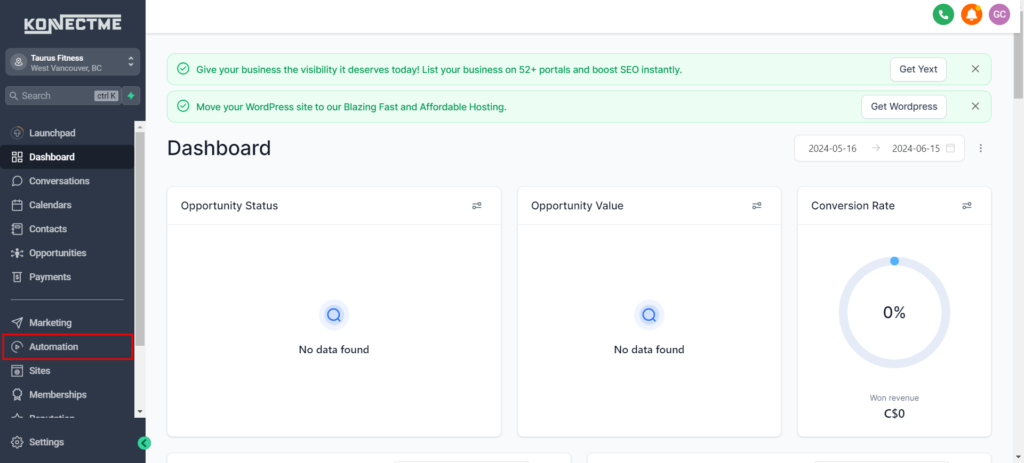
Step 1: Access Automation
- Log in to your Dashboard.
- Navigate to the “Automation” section from the left sidebar
Step 2: Create a New Workflow
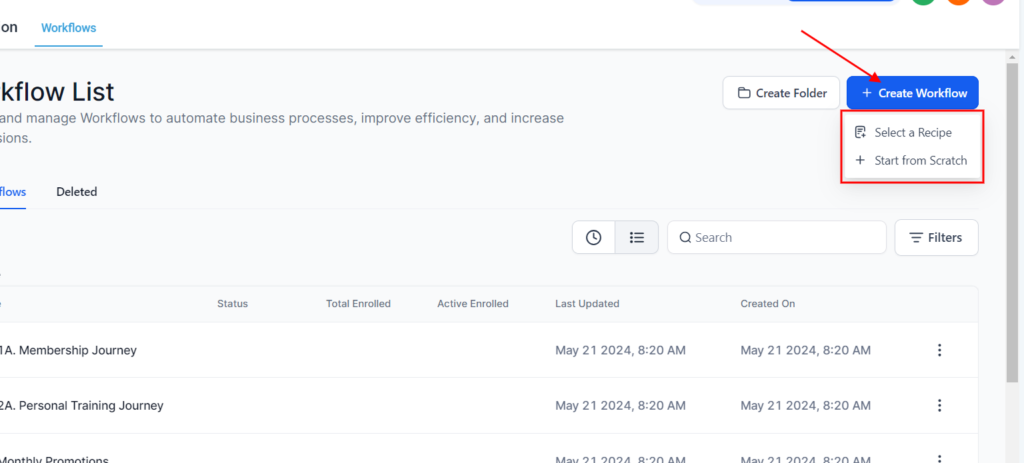
- Click on “+ Create Workflow” from the right side.
- Name your workflow, such as “Member Birthday Greetings” or whatever to your liking.
Step 3: Set Trigger
- Select the “Birthday Reminder” trigger to activate the workflow for each contact’s birthday.
Step 4: Define Actions
- Add actions to the workflow. Start with sending a personalized birthday greeting email or SMS.
- Optionally, include additional actions such as assigning tasks for follow-up or offering a birthday discount.
Step 5: Customize Communication
- Personalize the birthday message with merge tags to include the member’s name and special offers.
- Use rich text formatting to enhance the appearance of the message.
Step 6: Test and Activate
- Preview the workflow to ensure all actions are correctly set up.
- Test the workflow with a test member profile to verify that emails or messages are sent as intended.
- Once satisfied, activate the workflow to start sending birthday greetings automatically.
Tips for Success
- Personalization: Use merge tags to make birthday messages personalized and engaging.
- Automation: Regularly update the workflow to reflect changes in offers or messaging.
- Feedback: Gather feedback from members to optimize the birthday workflow based on their responses.
By following these steps, you can create an effective Member Birthday Workflow to enhance member engagement and satisfaction through automated birthday greetings and offers.